Bank Verification for Card Payments, Faster Card Checkout, and Booking Email Improvements

Bank verification steps now run inside checkout, card forms prefill known customer details, and booking emails use your business name instead of your location's.
Card Payment Stops Asking for Details You've Already Given
When a name and email are already known, either typed into checkout moments earlier or saved on your customer's account, the card form shows them as a short summary instead of empty inputs. That leaves only the card details to fill in, plus a billing address where your processor requires one. A Change link is there for anyone paying with a card in someone else's name.
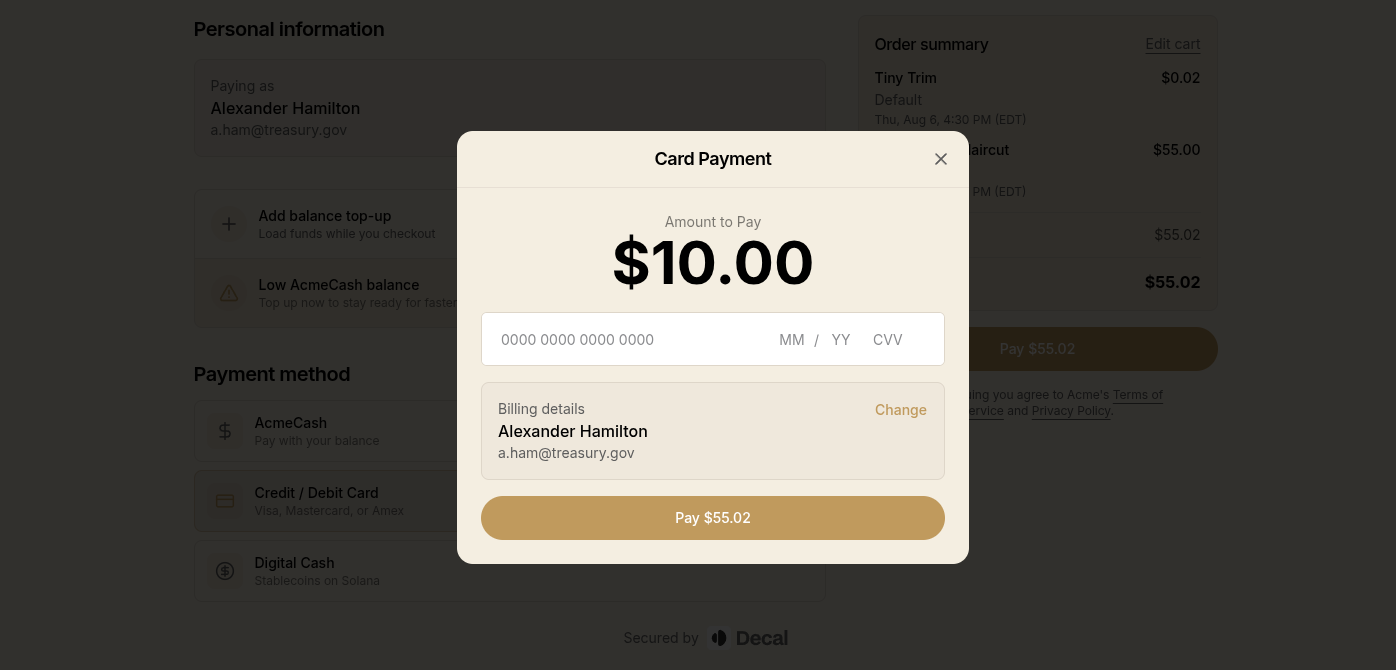 The card payment sheet showing the customer's billing details as a summary with a Change link, leaving only the card number to fill in
This applies to checkout, the order payment page, and balance top-ups. A top-up link shared with someone else still collects that payer's own details.
Where a name genuinely is missing, checkout asks for it now instead of moving straight to payment with nothing on file. Their known email is shown read-only rather than collected again. Relatedly, a customer with no name saved no longer sees their email address sitting in the First name field on their account page, or repeated back to them as their name in the checkout Paying as summary.
Card Payments That Need Bank Verification Now Go Through
Some banks want a second confirmation from the cardholder before they'll approve a charge. Until now those payments failed outright, and your customer saw a generic failure message with nothing useful to act on.
Checkout now shows the bank's verification step right in the payment sheet and finishes the payment once the bank approves it. The step opens full-screen, so there's room to read and tap through the bank's page, which matters most on a phone. This works everywhere your customers pay by card: the checkout page, an order's payment page, and a payment session in the pay app.
A few things keep it from turning into a dead end:
- Backing out cancels the attempt cleanly, so your customer can try the same card again or pay another way.
- The screen says what it's waiting on. A "Waiting for bank approval" indicator replaces what looked like a frozen page, and it turns into a button your customer can tap to confirm they're finished as soon as it looks like they are.
- Reloading mid-verification warns first, since a reload would lose the payment and mean starting over.
- Payments finish regardless of which bank issued the card. Banks report a completed verification in more than one way, and only one of those was recognized before.
If a verification is started and then abandoned, that attempt gets cleared on its own, so you're not left with a payment that looks like it's still in progress. Anything that may have been charged is flagged for review rather than cleared.
Clearer Reasons When a Card Doesn't Work
A declined card now tells your customer why, in plain language, along with whatever next step the processor suggests. Before, most of these arrived as the same generic failure, and the ones that did carry a reason showed it in the processor's own Title Case wording.
- A bank asking for verification says so, with the option to retry or use a different payment method.
- A flat rejection from the bank shows that reason instead of a catch-all failure.
- Retrying a card too quickly asks your customer to wait a few minutes and try again, rather than telling them to contact support.
- A verification page that can't load securely gets the same clear message and retry option, instead of leaving them looking at a blank screen.
Balance Top-Ups Show Up in Your Orders
Every balance top-up your customers buy is now recorded as a real order, so top-up revenue appears in your orders list and your reporting alongside everything else you sell. This is on for all merchants now, finishing the top-up work from a few weeks ago. Nothing changes for your customers: same sheet, pick an amount and a payment method, then Continue.
Top-ups bought from a mobile wallet pass go through that same order payment flow, which retires the
old standalone top-up links. One upside for your website: the /topup page slug is free now, so you
can use it for a page of your own.
Stored Value top-up amounts also sort correctly on the item page, where $10 could previously land after $100.
Booking Emails Sound Like Your Business
Booking notifications used your location's name wherever your business name belonged. If your location was called "Gym", customers got "You're confirmed at Gym" and "How was your visit to Gym?".
Customer emails now use your business name in the message itself and show the location in the Where details, where it belongs. They arrive from your business name too, and so do your own booking alerts, which used to come from "Decal".
Other changes across every booking email:
- Your alerts lead with the location and time. "New booking · Gym · Sat, Aug 1 at 2:00 pm" reads at a glance in a notification, where "New booking at Gym" didn't.
- A cancellation reads as a cancellation. Both versions now lead with "Booking canceled". A customer-initiated one used to say "Your cancellation is confirmed" in the subject and the heading, which is easy to skim as a confirmation.
- A booking canceled automatically is labeled that way, so nobody assumes a teammate did it.
- The inbox preview line shows the date, time, and location instead of repeating the subject.
- A booking with no customer account attached says "A guest" rather than "A customer".
- Multi-item bookings read properly throughout, including the thank-you email, which used to list every booked item as one long run-on.