Booking Management, Order Invoicing & Stored-Value Insights

Book and manage appointments from the dashboard, invoice customers with a copyable checkout link, and track top-ups and spend on a new stored-value activity chart.
Manage Bookings from Your Dashboard
Merchants can now run their entire appointment schedule from the dashboard. A new Bookings section gives you a live calendar board you can view by day, by week, or across a custom number of days, with a current-time indicator and appointments that refresh on their own. Click an open time to book, or click an appointment to view it, reschedule, or cancel, all without leaving the calendar. Next to the calendar is a filterable, sortable bookings list you can narrow by location and by date range.
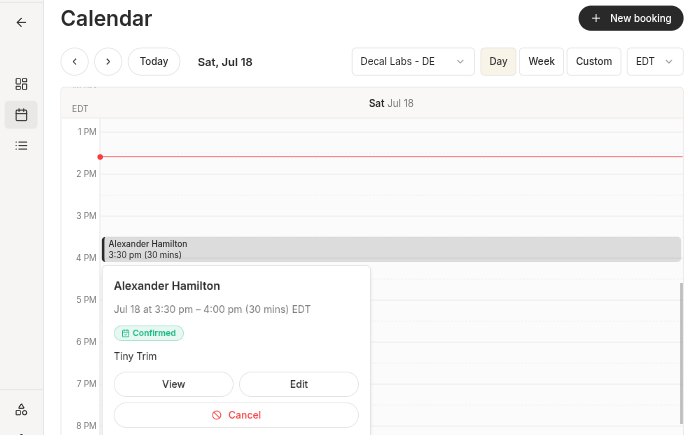 Booking calendar view in the dashboard
Creating a booking works from anywhere: the list, the calendar (pre-filled with the day you clicked), or a customer's profile. On a single screen you pick the offering and location, enter a start time and length (with a live heads-up if the time falls outside business hours or is already taken), and choose an existing customer or add new contact details inline. From a booking's detail page you can edit the customer, notes, or time, mark it completed or no-show, or cancel it, with your cancellation, no-show, and reschedule policies applied automatically. When you need to act outside a policy window, a one-off override with a recorded reason keeps things clean.
Flexible Scheduling for Services and Classes
Offerings can now be scheduled with far more control. A service or class can have different start times on different days (for example Mon and Wed at 6pm, Fri at 5pm), repeat on a custom interval, and include one-off sessions on specific dates, all on the same offering. You can also set special hours or closures to close an offering for a day, restate that day's hours for a holiday, or block out a range for a vacation or closure.
Any catalog item can be made bookable as a Service (one-to-one) or a Class (a group session with a capacity you set), and each item chooses the locations it's available at. That one selection is the single source of truth for where an item is sold and where it can be booked, so a multi-location merchant can't accidentally create a booking at the wrong place. Booking times are now stored and shown in each location's real timezone across the wizard, list, calendar, and detail page, matching how orders and receipts already show appointment times.
Booking management is rolling out to select merchants. Reach out if you'd like it enabled for your account.
Create and Invoice Orders
Merchants can now create an order directly from the Orders page. A wizard captures line items and an optional customer, then generates a checkout link you can copy and send. The order stays open until it's paid or cancelled. You can edit an open order (line items, customer, due date) from the order page at any time, and the checkout link you already shared updates automatically. The order detail page shows the invoice's checkout link and whether it's been paid, so you can re-copy the link or check its status without recreating anything.
Browse and Manage Your Catalog
The dashboard now has a catalog you can browse, search, and filter. It shows your active items by default, with archived items available from the status filter. You can create and edit both physical items and services from a single-step wizard, including pricing and categories. New items are active the moment you create them, with no separate draft or publish step. This is rolling out to merchants gradually.
Stored-Value Activity Chart
The Stored Value program overview now includes a daily Activity chart showing customer top-ups, customer spend, and bonus value issued over a period you choose (7 days, 30 days, 3 months, or year to date). Toggle each series on or off to focus on the activity you care about.
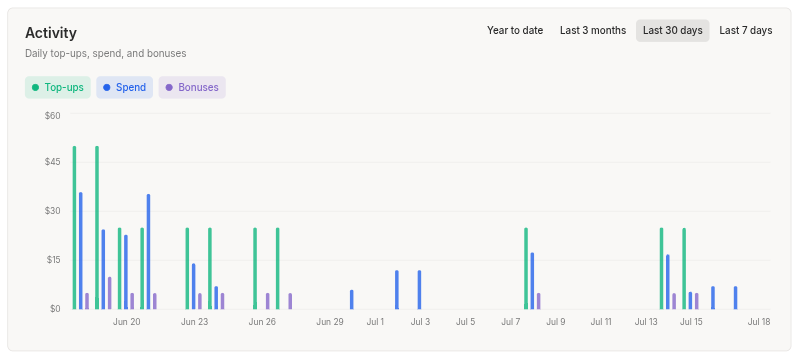 Stored-Value Activity Chart
Configure Your Legal Policies
Merchants can now set their Terms of Service, Privacy Policy, and Refund Policy from the new Policies tab on Settings, General. Link your own pages, or use a Decal-hosted template filled in with your business details. Your policies are then published on your Decal site for customers to read.
Accurate Timezones for Revenue Reporting
Locations now record their real timezone from the connected point of sale (e.g. Square, Lightspeed, etc) instead of defaulting to UTC, which keeps revenue reporting dated correctly. Existing Square locations are corrected automatically on the next sync. The locations list and detail pages now flag any location whose timezone couldn't be read, so you can set it yourself, and the timezone picker is now a searchable dropdown that shows each zone's current UTC offset.
Minor Improvements
- Cleaner links in the address bar. Order, transaction, location, customer, loyalty, and stored-value pages now show short, readable IDs. Older or shared links still resolve automatically.
- "Order Not Found" fix on Square checkout. Open orders pulled from Square are now saved as soon as they're listed, so selecting one reliably opens its order page.
- Clearer customer labels on orders. Order details now distinguish "No customer attached" from a guest contact and from a linked customer.
- Jump to Square from a customer. A customer's linked accounts now include an "open in Square" link to the matching record.
- Friendlier date and time pickers across business setup, availability, and location hours, plus a fix for payment-link expiration dates showing in the wrong local time.
- Appointment durations read naturally on the public booking site (for example "2 hrs" and "45 mins").