Booking Reminders and Configurable Homepages

Customers get an automatic reminder before every appointment and can turn it off themselves, and your site's homepage can lead with your bookable services.
Booking Reminders
Reminder emails now go out ahead of every appointment, on every account running Bookings. There's nothing to turn on.
Customers control their own reminders from their notification settings on your site, alongside confirmations, cancellations, and reschedules. Reminders are the one they can switch off completely.
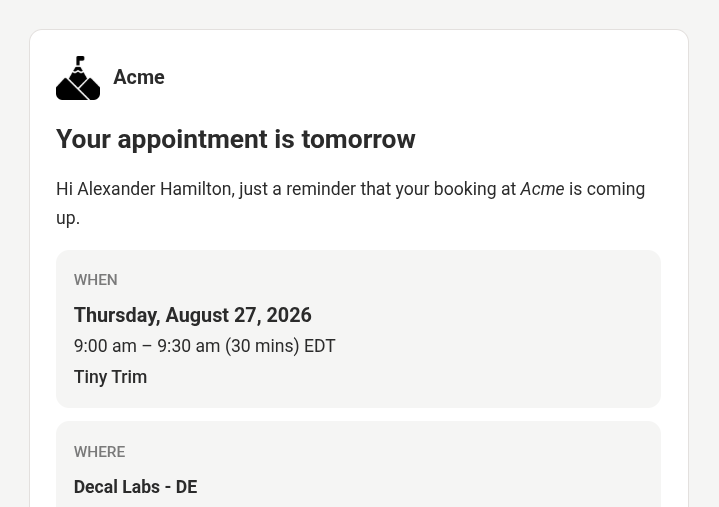 A customer booking reminder email showing the date, time, and location
Add to Calendar Links
Booking confirmation and reschedule emails now carry one-tap Add to Calendar buttons for Google Calendar, Apple Calendar, and Outlook. Each with its own icon, plus a link to view the appointment online. The links resolve live, so a link in an older email always adds the appointment's current time even after rescheduling.
 Add to calendar links for Google, Apple, and Outlook above a Manage appointment button
Configurable Homepages
Your site's homepage now matches what you sell. If you take bookings, visitors land on your bookable services and can pick a time without signing in first. Merchants running customer balances keep the homepage they have today, and if you run both, bookings takes it.
You can set this yourself under Website → Settings. Every option says what a visitor lands on, Auto tells you which page it currently resolves to, and options that need an add-on turned on first say which one. Saving takes effect on your live site right away.
Minor Improvements
- Booking emails link to your notification preferences and published policies at the bottom. Nothing appears for a policy you haven't published.
- Taking your site online or offline moved to the actions menu on Website → Settings, with a Live or Offline badge beside the title. Both directions confirm first and say what happens.