Stored Value Preset Names, In-Place Editing & Consistent Amount Formatting

Preset top-up amounts can now carry a name like '10-Session Pack', presets are editable without deleting them, and whole-dollar amounts drop the trailing cents everywhere.
Named and Editable Preset Amounts
Merchants can now give every Stored Value top-up/reload amount an optional name, so a $210 reload is presented as "10-Session Pack" alongside the dollar figure. Add one from Stored Value → Settings in the Preset Amounts card. Click any preset there to load its amount and name back into the form, change either one, and hit Update. Re-entering an amount you already have renames it in place, and renaming works even when your list is full.
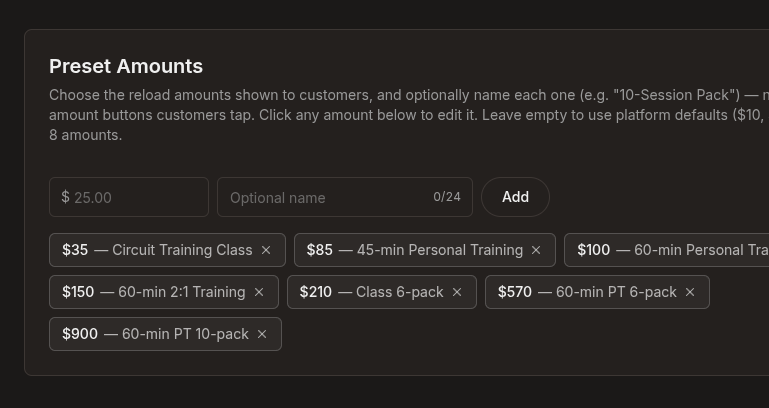 The Preset Amounts card with named reload amounts including $210 Class 6-pack and $900 60-min PT 10-pack
Customers see the name wherever they pick an amount: on your balance page, in the add funds widget on your homepage, and in the top-up grid at checkout. It sits above the dollar figure on the amount buttons, and beside it in the dropdown when you offer a longer list of amounts.
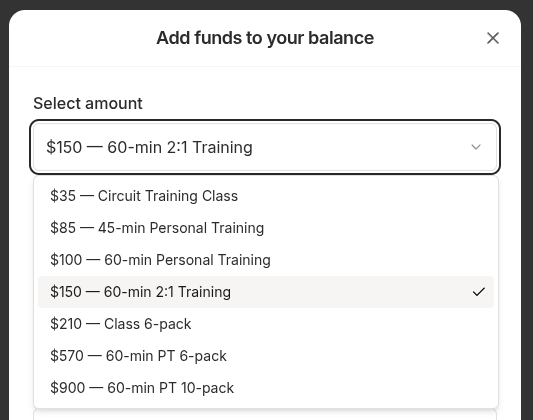 A customer's Add funds to your balance sheet with the amount dropdown open, every amount listed with its name
Consistent Amounts and Bonus Copy
Whole-dollar amounts drop the trailing cents everywhere they appear, so your settings page reads $10 $25 $50 $100 and the bonus preview beside it reads "Get a $5 bonus when you load $25". Amounts that carry real cents still show them, so a $12.50 preset is unchanged. Order lines, receipts, balances, and the "added to your balance" confirmation all keep exact cents.
Minor Improvements
- One bonus callout on the add funds sheet, not two. It follows the amount your customer picks, pointing at the next tier and then confirming the bonus once the amount qualifies.
- Customers can see where a balance spends. A note under the amount picker names your balance and your business, so it's clear the balance covers anything you sell.
- Section headings read as headings. Select amount and Select Payment Method are larger and marked up properly, so a screen reader can move through the sheet section by section.
- Amount buttons and the named-preset dropdown are taller, which makes them easier to read and tap on a phone.
- Issue credits limits are described in the right units. The minimum read "at least $1.00" for a one-cent floor and the maximum read "cannot exceed $100,000.00" for a $1,000 ceiling. They read $0.01 and $1,000 now.