Book and Pay Online, Automatic Booking Emails, and Store-Credit Refunds

Customers can now book and pay for services online, get automatic confirmation and reminder emails, and receive refunds as store credit.
Customers Can Book and Pay Online
Building on last cycle's customer booking pages, where customers could browse your services and pick a time, they can now finish the booking and pay online.
Customers add one or more of your services or classes to a cart, held together under a single countdown, and check out on a cleaner two-column checkout page: contact details and a desired payment method. Signed-in customers are recognized automatically, and guests enter their details once, which creates an account they can sign into later to see their history. An order is created only when a customer goes to pay, so revisiting, reloading, or going back never creates a duplicate. Each time slot is locked the instant before payment, and the booking is confirmed the moment payment succeeds. If someone takes the slot first, the customer is told directly at the payment step and can pick another, with no charge made.
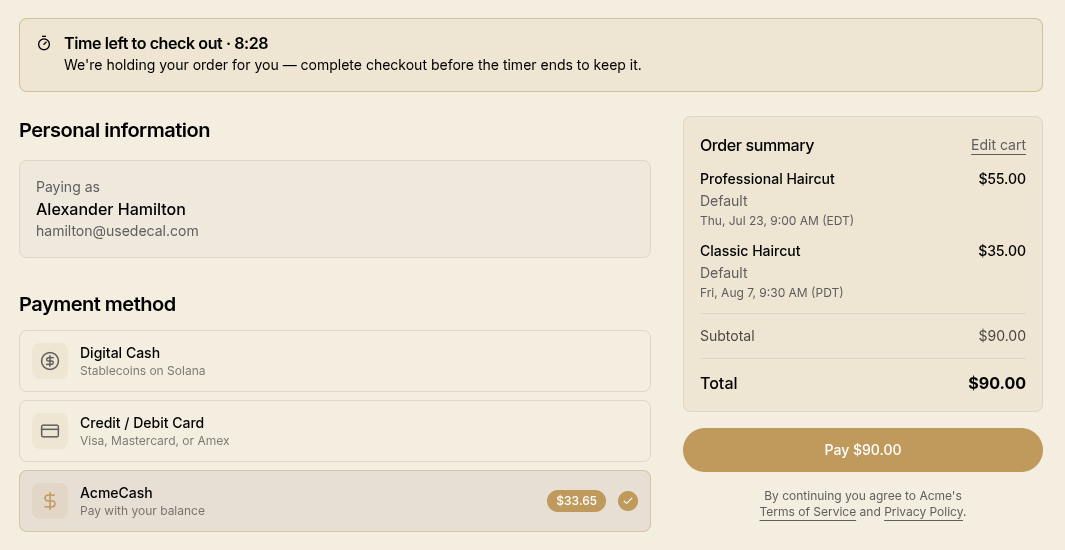 The online booking checkout page with contact details and payment methods
Customers can also book across more than one of your locations in a single checkout, for example a session at one studio and a class at another, paid once as one order. Each booking is still made at its correct location and shows in that location's timezone on the receipt.
Automatic Booking Emails
Bookings now keep both sides in the loop by email, from the first booking to the follow-up:
- Confirmations go to the customer as soon as a booking is confirmed, and you get a new-booking alert.
- Cancellations and reschedules notifies the customer and you. Reschedule notifications show both the previous time (now free) and the new one, so you don't have to cross-reference your calendar to see what opened up.
The confirmation email is redesigned into clear "When" and "Where" sections. The date is spelled out in full ("Saturday, August 1, 2026") and shown prominently, the location's full street address and formatted phone number appear, and "Get directions" is a proper button. Cancellation emails now show the reason in its own card below the booking details, so it reads clearly instead of a small line above them.
Customers control what they hear from you. A new Notifications page in a customer's account groups booking emails so they can toggle confirmations, cancellations, and reschedule notifications on their own. Confirmations, cancellations, and reschedules always keep email on, so customers always keep a record of their bookings.
Refunds as Store Credit
You can now refund a customer as store credit even before they've joined your stored value program. The customer's wallet is created automatically behind the scenes and the balance is waiting the first time they sign in.
Cancelling a paid appointment now opens a cancellation wizard where you can more easily refund in the same step, choosing the refund method and amount. The amount defaults to that booking's share of the order, so cancelling one booking of a multi-booking order doesn't over-refund, and the wizard shows how much of the order has already been refunded.
A refunded order also shows a proper refunded receipt on the customer-facing order page. The items and totals stay visible under a clear "Refunded" or "Partially Refunded" header and the refunded amount.
A Cleaner Merchant Site
- Desktop navigation. Your site now shows a proper desktop navigation bar with inline links, keeping the mobile menu for smaller screens. "Show Member ID" is now available from the account menu.
- Location booking pages. Each location's booking page now shows its address, a map, opening hours, and phone number.
- Browse everything in one place. Customers can browse everything you offer to book from a
single
/bookpage. Picking a service offered at more than one location opens a location selector. - Back to where you were. After signing in, customers return to the page they originally opened instead of the home page.
Minor Improvements
- Choose where each item sells. Picking which locations a catalog item is available at is now generally available, right in the catalog item wizard and on the item detail page. Leave it unset to keep an item available at every current and future location.
- Smoother sign-in at checkout. Fixed a sign-in issue where verifying your identity, including when paying with a stored-value balance, could get stuck asking you to verify again or briefly flash a "wallet unavailable" error while loading.
- Cart clears after mobile wallet payment. After paying with a mobile wallet and returning to the original browser tab, the cart now correctly empties along with the confirmation instead of lingering.
- Refresh-safe confirmation. Refreshing the checkout page right after paying now reliably lands on your order confirmation instead of an empty cart.
- Jump to the order from a booking. The booking detail page now has an "Order" button when a booking has a linked order.