Itemized Card Fees, Clearer Refunds, and Booking Timezone Improvements

Order pages now break out the order total, processing fee, and what the card was actually charged, with the option to reimburse the fee on a refund.
Itemized Cart Processing Fees
Card payments may carry a processing fee that the card processor bills on top of your order total. Checkout was showing that fee correctly, but nothing saved it. A $19.99 order paid by card recorded no fee at all, and the fee vanished from the customer's receipt the moment the page reloaded.
The charged total is now the recorded source of truth for what the customer paid. The payment summary on an order spells out the full breakdown:
- Order total, what you charged.
- Processing fee, paid by the customer to the card processor. It is not deducted from your payout.
- Charged to card, what the customer actually paid.
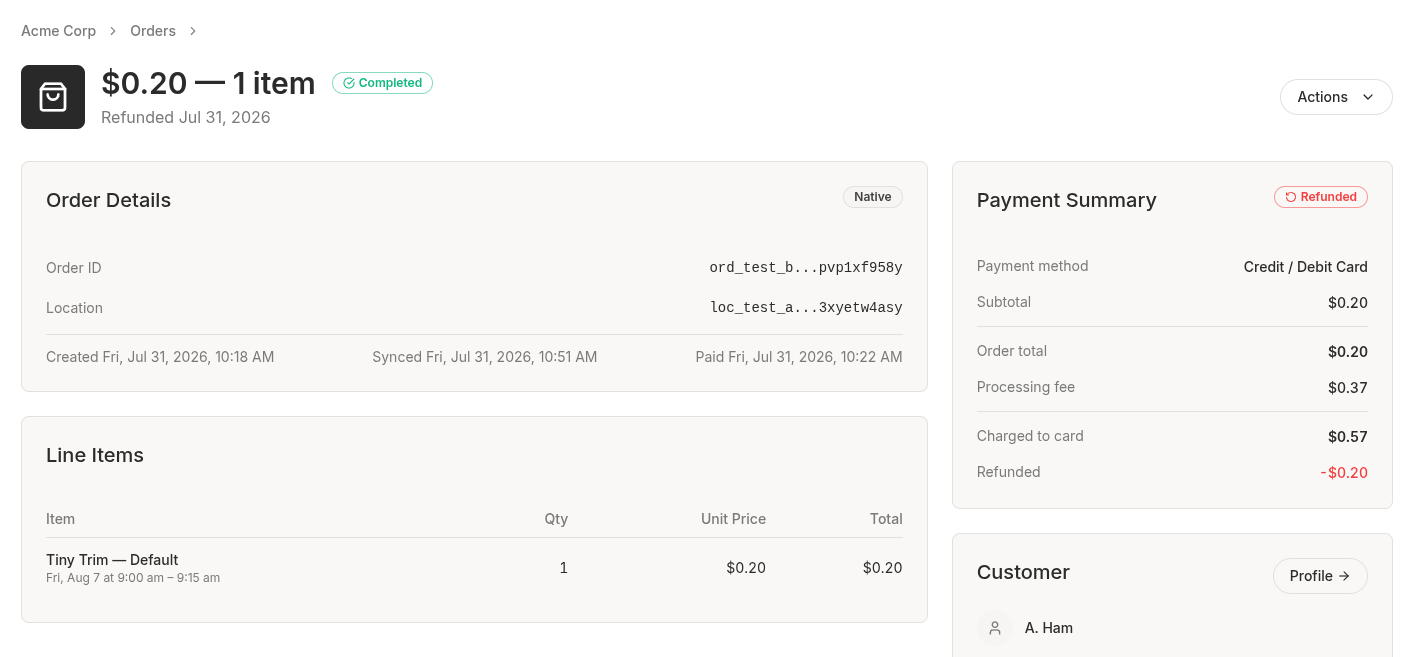 An order's Payment Summary showing the order total, processing fee, and charged to card
The order's payment summary also shows how much of the order has been refunded to date, and the payment status badge moved into its header. On your customer's side, the fee stays on their receipt after a reload, not only in the seconds right after they pay.
Every fee the processor bills is captured now, not only the credit card fee, and the portion you absorb is left out so the recorded fee is the customer's share. Transaction records show the correct charged amount too, which was previously off by 100x on the source amount.
Reimburse the Processing Fee When You Refund
You can now choose to reimburse the processing fee when you issue a refund.
That fee went to the card processor rather than to you, so reimbursing it comes out of your own funds. The refund dialog says exactly that, shows the amount, and leaves the box unchecked by default. It's available on a full refund of an order that hasn't been refunded before, and when it isn't available the dialog explains why.
Consistent Appointment Timezones
Booking times on the cart page and in the payment success headline were rendering in the location's timezone with nothing on screen to say so. Cart, checkout, the success headline, and the order receipt now all show a booked appointment the same way: converted to the viewer's timezone and labeled with its abbreviation.
If an order has bookings at more than one of your locations, each line now shows its own location. Before, every line took whichever single location the checkout page happened to resolve.
A Real Starting Point for an Empty Catalog
A merchant opening Catalog for the first time got an empty table with column headers, pagination controls, and "No catalog items found." That's now a setup card explaining what the catalog is for, with an Add Item button that opens the item wizard.
The card only appears when you genuinely have nothing. The catalog list defaults to showing active items, so an organization whose only items were archived used to look identical to a brand new one. It gets the table now, and can clear the status filter to find its items. Filtering or searching down to zero results keeps the table too, and says "No catalog items match your filters." instead of implying nothing exists.
Minor Improvements
- The card form adds up out loud. The fee breakdown reads "$0.20 + $0.37 processing fee" so it's clear which part is the order and which is the fee.
- Balance top-ups lead with the billed amount. The top-up sheet shows what the card will actually be charged, matching order checkout, rather than the amount before the fee.
- Improved error messages in card payment forms.
- Add-ons switch on right away. When we turn on an add-on or integration for you, it shows up on your site within seconds instead of taking up to five minutes.