Classes on Your Booking Calendar, Class Rosters & Improved Checkout

Every class shows as a calendar block with live seat counts, class rosters can be filtered by payment status, and paying an unpaid order now uses the full checkout layout.
Classes on Your Booking Calendar
Classes show up on your booking calendar as soon as you schedule them. Each one is a single block carrying its seat count, so an empty class still holds its room and time. A class whose bookings were all canceled stays on the calendar too.
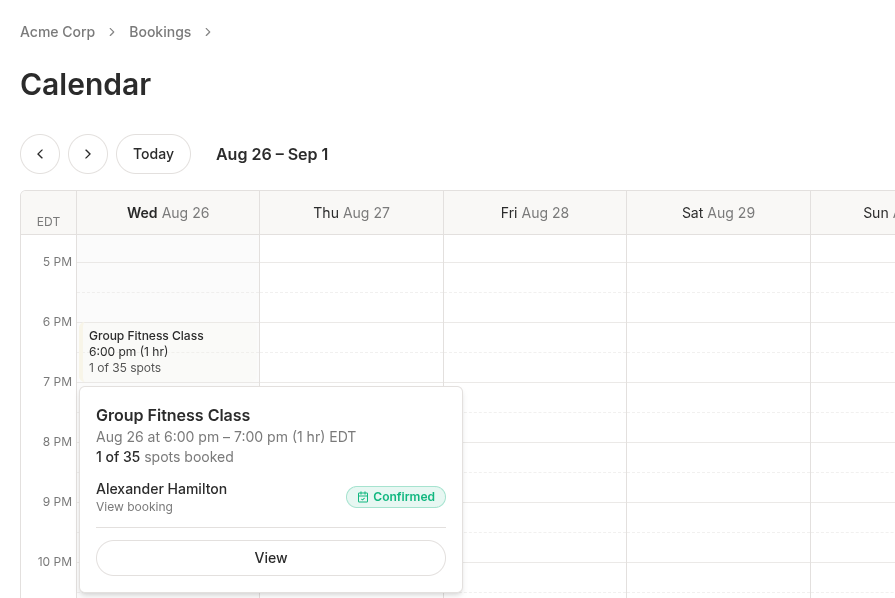 A Group Fitness Class block on the booking calendar showing "1 of 35 spots" with its roster open
When you change a class's schedule after people have booked, the old time is flagged Schedule changed and says what happened: the bookings are still active, the attendees haven't been told, and you can keep the session or reschedule them from the roster.
Class Rosters
Clicking a class on the calendar opens its roster, and a View button there opens a dedicated class page. An Overview tab covers the location, time, and seats booked; a Roster tab gives the attendee list a full-width, searchable table. Canceled attendees stay listed, and you can add an attendee from either tab.
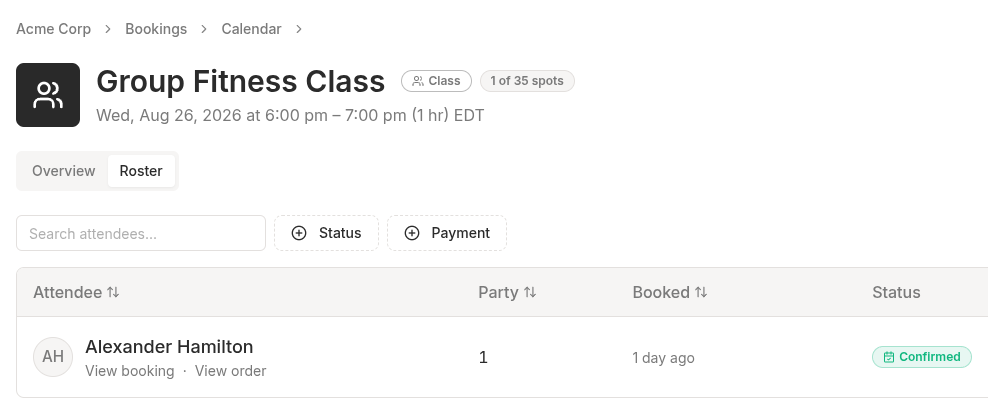 The Roster tab of a class page with a searchable attendee table, Status and Payment filters, and a confirmed attendee
Each attendee's payment status sits alongside their booking status, and you can filter by it. A booking with no order behind it, a comp, a free session, or someone paying in person, is marked No order rather than counted as unpaid.
Improved Checkout
Paying an unpaid order now uses the same layout as the cart, with the order summary alongside the payment step. Details you require before payment (name, email, phone) are collected on the page itself rather than in a pop-up.
Choosing a payment method selects it, and the Pay button starts the payment and shows the amount being charged. Name, email, and phone can now be collected on any order, including in-person purchases, where they're optional.
Minor Improvements
- Cancelling from the booking calendar now offers refund controls. The Cancel button opens the same cancel-and-refund flow as the booking page: reason, refund amount, refund method. Past a cancellation window you can override the policy and cancel anyway, with your reason recorded.
- Booking times are right the first time they appear, instead of showing in UTC for a moment before switching to the customer's own timezone.
- A new Security page under Account lists every device signed in to your dashboard, and ends any of them or all your other sessions at once.
- Connecting Square or Lightspeed reports its real outcome. A connection that had succeeded used to report a failure and skip the import of your locations.
- Confirmation dialogs can't be dismissed while they're working, so a refund or a cancellation can't be abandoned halfway through.
- Email capitalization no longer matters for signing in, team invites, or matching customers.