Self-Serve Cancellations, Applied Booking Policies & Booking Page Location Details

Customers can cancel their own appointment and get the refund your policy grants, and your booking pages now show location details and appear in search results.
Self-Serve Cancellations
Customers can now cancel their own appointment from their booking page, and the refund your cancellation policy calls for is issued automatically as store credit If the customer is not eligible for a refund at time of canceling, they can still cancel and the page says so before they confirm.
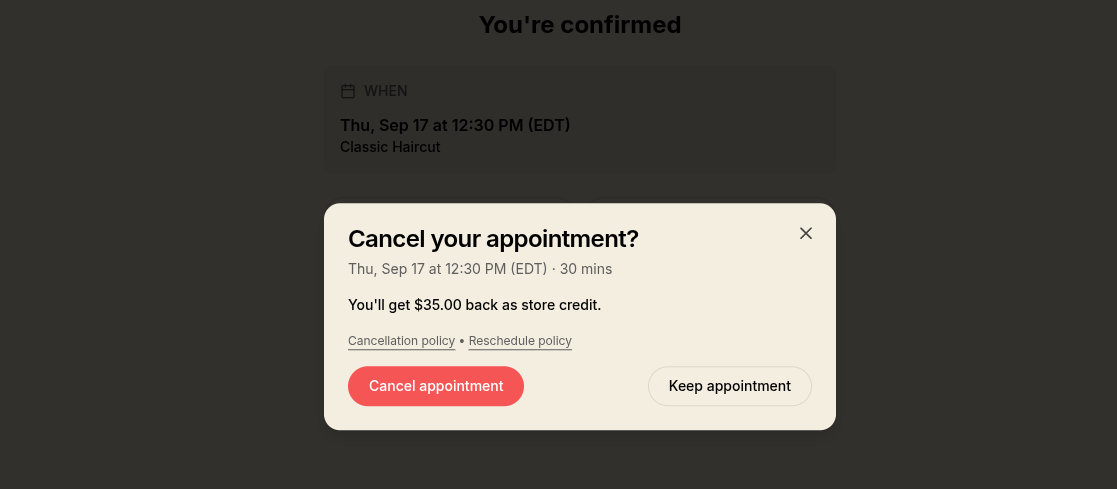 The cancel dialog on a customer's booking page, showing the store credit refund
Bookings with no cancellation policy, and anything Decal can't refund automatically, still show the customer a "contact the business" message so your staff can cancel and refund manually as needed.
Applied Booking Policies
The dashboard's booking details page now shows which of your policies apply, in plain language, and flags any policy you've changed since, so you can see the terms the customer actually agreed to next to your current ones. Opening a policy's terms takes you straight to editing that policy.
Policy terms now read in neutral third person, "up to 24 hours before the appointment", so the same sentences work at checkout and in the dashboard. This changes the wording customers see.
Booking Page Location Details
The booking page for a single service or class now shows your location details below the time picker: map, address, phone, directions and opening hours. The location name links back to that location's full list of bookable services.
Those pages are listed in search results now too! A location page is titled with its location and city, each service page with its own name, duration and price, and both publish structured data so search engines can show them as rich results. Your cart, checkout and your customers' own orders stay out of search, as before.
Minor Improvements
- Booking pages no longer offer dates inside your minimum notice. Where one can still be picked, the page names your real notice, "48-hour notice required", right away.
- Customers land on their receipt after paying, and held times that expire during checkout are re-held automatically. A customer whose time was taken is told which one.
- Cancelling one appointment on a multi-appointment order refunds that appointment's own price, including after it's been rescheduled.
- Treasury funds held for you always appear on your Finances page, even when the transfer that started them failed partway, and an unfinished withdrawal can be claimed again from there.
- Failed transfers explain themselves consistently everywhere they appear, including whether your funds moved. An expired payout now reads in a neutral color rather than red.
- Transaction pages lead with the amount, "$42.00 Payment received", and link to the customer and order.